DDD Events
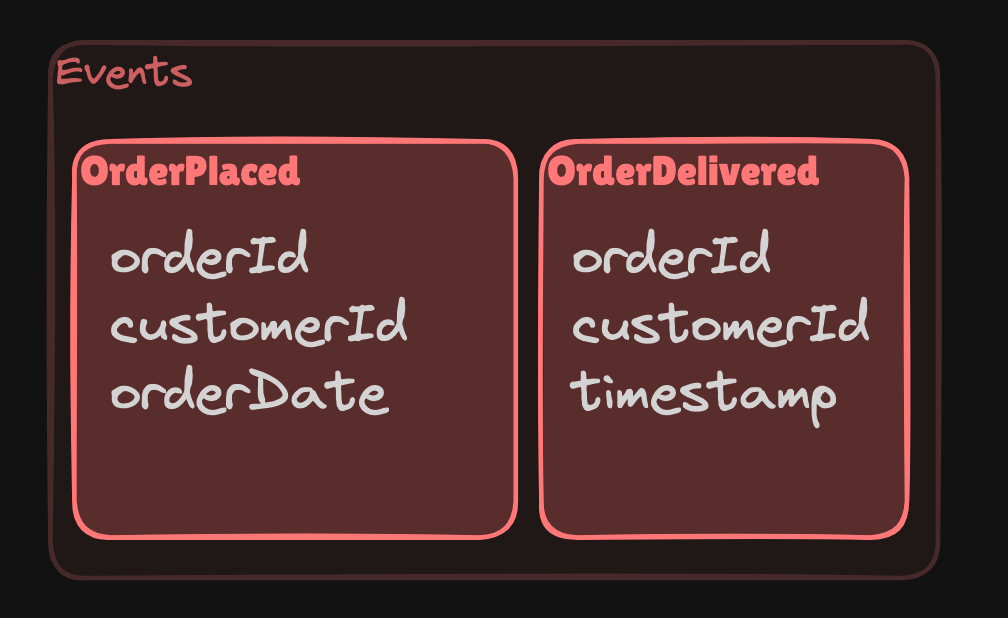
Event
In Domain-Driven Design (DDD), events play a central role, particularly in terms of how changes in the system are communicated between different parts of the domain model. Events are a way to express something important that has happened in the domain. In DDD, we often work with domain events, which are events that are significant to the business logic or the domain itself.
Key Concepts
-
Domain Events: These are events that describe something that has occurred in the domain and is of interest to the business (e.g., "Order Placed", "Product Shipped"). Domain events represent state changes and are immutable, meaning once they are created, they cannot be modified.
-
Event Handling: When an event occurs, other parts of the system might be interested in this event and can respond to it. This decouples the event producer from event consumers, allowing for a more flexible system.
-
Event Dispatching: Events can be dispatched synchronously or asynchronously. Synchronous dispatch means event handlers are invoked immediately, while asynchronous dispatch means that the handlers may run in the background (e.g., using a message queue).
Example of Events in Domain-Driven Design
Let's imagine a simplified e-commerce domain where a customer places an order. This triggers an OrderPlaced domain event that may result in various actions like notifying the customer, updating stock, etc.
1. Defining a Domain Event
class OrderPlaced {
  constructor(
    public orderId: string,
    public customerId: string,
    public orderDate: Date
    ) {}
}
In this example, OrderPlaced is a domain event that encapsulates data about the event (order ID, customer ID, and order date).
2. Publishing Domain Events
We need a mechanism for raising and publishing events when they occur. We can create an EventDispatcher/EventBus(you name it) that will handle this.
class EventDispatcher {
  private handlers: { [eventName: string]: Function[] } = {};

  register(eventName: string, handler: Function) {
    if (!this.handlers[eventName]) {
      this.handlers[eventName] = [];
    }
    this.handlers[eventName].push(handler);
  }

  dispatch(event: object) {
    const eventName = event.constructor.name;
    const handlers = this.handlers[eventName] || [];

    handlers.forEach(handler => handler(event));
  }
}

const eventDispatcher = new EventDispatcher();
3. Publishing the Event from the Domain
Imagine we have an OrderService that handles order placement:
class OrderService {
  constructor(private eventDispatcher: EventDispatcher) {}

  placeOrder(orderId: string, customerId: string) {
    // Business logic for placing an order (saving to the database, etc.)

    const event = new OrderPlaced(orderId, customerId, new Date());
    this.eventDispatcher.dispatch(event);
  }
}
Here, after the order is placed, we create an OrderPlaced event and dispatch it using the EventDispatcher.
4. Handling the Event
We can now define event handlers that will respond to the OrderPlaced event. For instance, we might want to send an email to the customer or update inventory.
const sendEmailToCustomer = (event: OrderPlaced) => {
  console.log(`Sending email to customer with ID ${event.customerId} for order ${event.orderId}`);
};

const updateInventory = (event: OrderPlaced) => {
  console.log(`Updating inventory for order ${event.orderId}`);
};

eventDispatcher.register('OrderPlaced', sendEmailToCustomer);
eventDispatcher.register('OrderPlaced', updateInventory);
5. Example Usage
const orderService = new OrderService(eventDispatcher);
orderService.placeOrder('order123', 'customer456');
This would output:
Sending email to customer with ID customer456 for order order123
Updating inventory for order order123
Synchronous vs. Asynchronous Event Handling
In this example, events are handled synchronously, meaning the handlers are executed immediately when the event is dispatched. However, in a real-world scenario, you might want to handle events asynchronously, especially when dealing with tasks like sending emails or updating other systems. For asynchronous handling, you could dispatch events to a message queue (e.g., RabbitMQ, Kafka) and process them later.
Advantages of Using Domain Events
- Decoupling: Events allow different parts of the system to communicate without tightly coupling them together.
- Auditability: Events can be logged or persisted, providing a clear history of what has happened in the system.
- Scalability: By using asynchronous event processing, systems can be scaled more easily.
Conclusion
Events in Domain-Driven Design allow for clear communication between different parts of the domain and ensure that changes to the domain are tracked in a meaningful way. By implementing domain events in TypeScript, we decouple our system's components, making it easier to scale and maintain.
Next
Visit Entities to dive deeper into Domain Driven Design.
Check next:
Additionally in case you are intresed into ways of storing these Events as a history of them for so-called Event Sourcing:
READ
Latest readings
Readings are sites which will help you with detailed
information about given topic. Read latest ones from Learn.
06-03-2026
Build your own local voice assistant powered by Ollama.
06-03-2026
Generate YouTube thumbnails with FastAPI and Ollama.
05-09-2024
Compare Neo4j and Tigergraph databases, which is easier to work with, etc.