"One to rule them all" - service rebuild story
V1 → V2

Kacper Walczak · 03-09-2024
Service rebuild + NoSQL migration of millions of documents on Google Cloud.
Introduction
I was working at educational project. We got there a microservice to store Tags that were attached to the Tree Structure content model.
I have faced a problem to rebuild entire service to V2, due to the fact that V1 was not serving our purposes because V1 models allowed data to be not properly inserted into Tree Structure.
Main reason: Data from DB was not shown properly on screen - it was stored in wrong places, and not retrievable.
Data was stored in NoSQL database Firestore on Google Cloud Platform and even it was not fully opened it contained few millions of documents.
Requirements for migration
- We needed to use
Feature Flagsbecause system was still running - We needed to migrate millions of documents to new model before switching FF(Feature Flag)
- We needed to rewrite frontend view as well(it was outsourced previously and it was easier to rewrite than to deal with it) to fulfill new improvements to process
- We wanted to securely switch to V2 with possibility to fallback to V1 if something was not right
Problem
Our V1 model was using Firestore to store all it's data. But it was not doing it right, V1 stored data in this form:
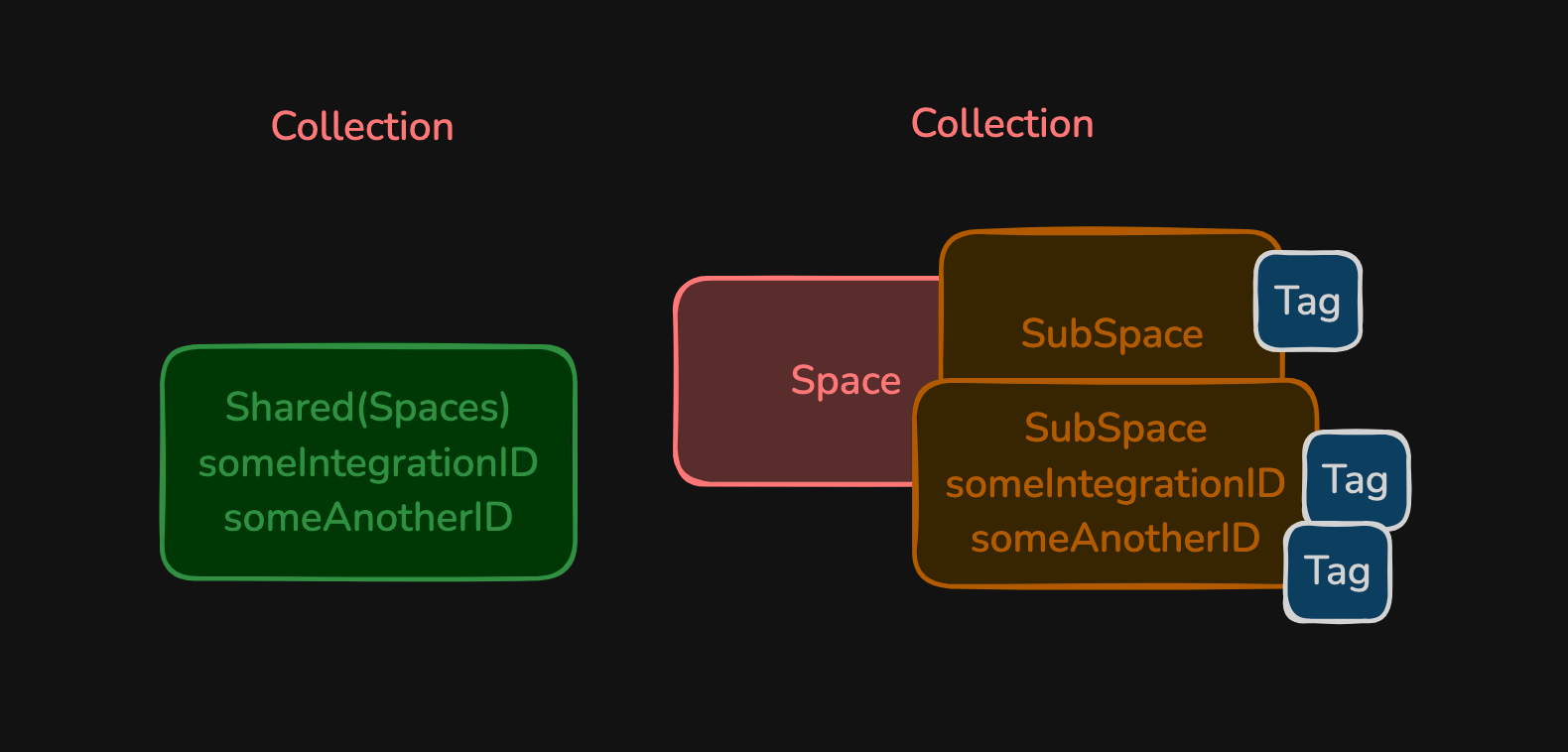
Problem: list of shared spaces with tags inside would match ONLY with weird integration IDs... and they were based on LIMIT(1) and... there was possibility to match wrong shared doc due to the Firestore way of generating ID's that can move upwards our new Shared document what... could destroy LIMIT(1) ordering.
Solution
Prepare Requirements
Firstly we need to gather all requirements from the business. We need to check if everything is covered and written on some document(can be as simple as shared Word doc via browser).
Once we gathered them we can move on.
Create Architecture Proposal
Second step is to think about all pros and cons of different approaches for our goals.
Programming can solve your problems in infinite ways, but there will be cons and pros of each of them.
Decide what are your Architecture Drivers like:
- when project should be finished?
- what availability of this new product should be?
- do we need to test it in some specific way?
- how much money(spreads on team that can do the job) do we have for it(ask your boss if you don't know, maybe just ask for how many ppl we can put there)?
- what are security rules?
Once we will be sure about all drivers, we can carry on with thinking about mulitple approaches and compare if they fit our needs.
For this problem I have created this model:
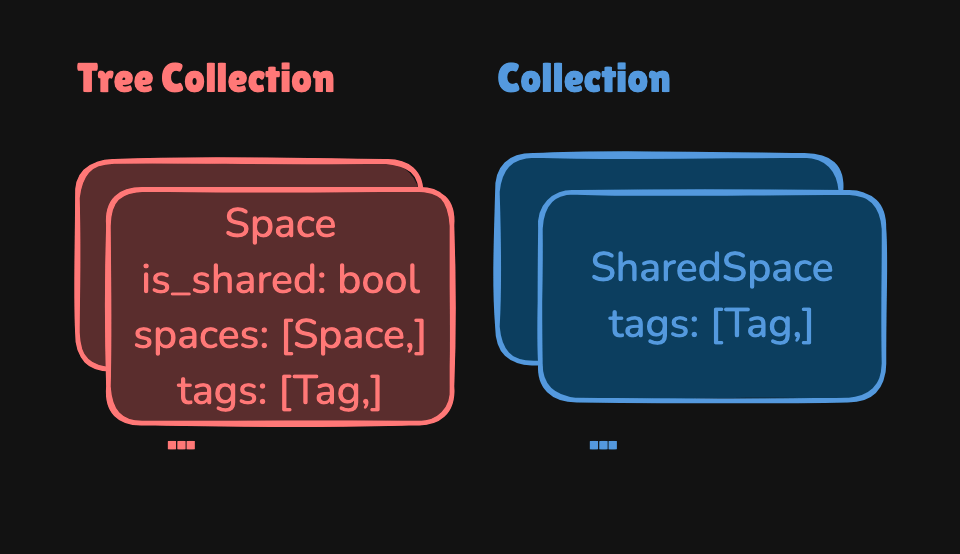
With it we could simply fetch data for tree with:
FETCH TAGS: {pathToSpace: Space1/Space2/Space3}And the response would look like this:
{
    "Space1": [Tag1, Tag2],
    "Space2": [Tag2, Tag3],
    "Space3": [Tag4]
}
I have proposed even GraphDB approach (take a look at Graph DB comparison), due to the fact that with it we could omit Space1/Space2/Space3 with simply:
FETCH TAGS: {id: Space1, withChildren: true}

or

FETCH TAGS: {id: Space3, withParents: true}
And result will be the same as with NoSQL approach.
You can achieve same behavior with Linked List Data Structure in regular SQL/NoSQL but it will be a bit slower than GraphDB (graph store data in RAM).
Accept Architecture with Team/Architect/Team Lead
Our Architect decided to use simplest possible approach to this problem, we stayed with:
FETCH TAGS: {pathToSpace: Space1/Space2/Space3}Inserts are similar.
Prepare PoC
I have prepared 3 PoC, one with Neo4j (I love Cipher ❤️ and library Apoc.spanningTree for Neo4j), one with Tigergraph using Breadth-First-Search Algorithm (Tigergraph is really hard if you don't have PhD and need to go through their documentation at that time, it pointed to mathematical graph theory bullshi*, but they luckily provided this function in their api/github so I took it from there and removed unnessesary elements).
The final version was built around NoSQL Firestore, due to the pricing of Neo and TG (Firestore is cheaper in our case).
Test if it fulfill Requirements
We have put final product in front of the business on multiple video-calls.
They bring new ideas (and new requirements... sic!).
But it passes...
Create Feature Flags
Feature Flag is simply an object that we will check if is true/if exists and if so, then route to V2 -> otherwise route to V1 approach.
In NoSQL Firestore you can simply create another collection of documents with ID, like:
- Create collection
FeatureFlags, - Append simple document with just id
v2_enabled_fetch_tagsto the DB:
[
    "v2_enabled_fetch_tags": {},
]- On your actions you can check now if it exists, you can always remove this FF and it will fallback to V1 service.
Prepare V2
Now you need to prepare your V2 final product with all architecture drivers covered.
Create new project or add to existing repo subfolder V2, it's up to you.
Write every required endpoints, models, etc.
Setup Cloud deployment files like: <something like app>.yaml | Dockerfile | tf folder (Terraform to simply spawn your machine) | etc.
It will depend on what way of deployment you have focused with this product.
Bring to the project some TestContainers or simply use Emulators to emulate DB in Unit Tests.
Write Integration Tests to ensure business logic is done in a valid way.
Preapare ACL (Anti Corruption Layer)
Anti Corruption Layer can be used within your models (like get this children if V2, else get that), within your commands in CQRS (if version: 1, do that, if version: 2, do else).
In this approach we simply created top layer to reroute to specific service (we have had one repo with v2 folder).
def fetch_tags(path):
    v2_enabled = ff_repo.exists(FF.v2_enabled_fetch_tags)  # FF.v2_enabled_fetch_tags return simply "v2_enabled_fetch_tags"
    service = v2_service if v2_enabled else v1_service
    return service.fetch_tags(path)
So as you can see it's pretty straightformward.
Write migration scripts
I have used Javascript with RxJS library due to the fact that we needed to concurrently migrate documents to the new shape in DB.
I have used CQS (Command Query Seperation) pattern to distinguish between Read and Write (to ensure no problems arise, still millions of documents and I'm just a human).
Example of CQS:
const Read = (db) => ({
    fetchTags: (spacesIdArr) => // fetch here... return Observable
    // ... rest of the methods
})

const Write = (db) => ({
    insertTags: (path, tags) => // insert tags in some way
    // ... rest of the methods
})
Why RxJS?
RxJS provides perfect API for async operations with operators like: merge (to increase throughput) | concatMap (to freely iterate with order) | pairwise (to check if prev/next elements are similar) | etc.
// ...
/**
 * Flattened tree - each represents way to leaf
 * @example
 *  space1 {tags: [...]}
 *    space2 leaf {tags: [...]}
 *
 *  space3 {tags: [...]}
 *    space4 {tags: [...]}
 *      space5 leaf {tags: [...]}
*/
const spacesToMigrate = [
    ["space1", "space2"],
    ["space3", "space4", "space5"],
]
const fetchTagsObservables = spacesToMigrate.map(idsInOrder => Read(DB).fetchTags(idsInOrder)) // sub and get {"space1": [Tag1,],}
const spaceTreesWithTags$ = merge(...fetchTagsObservables)
const migration$ = spaceTreesWithTags$.pipe(
    map(res => Object.entries(res)),
    merge(entries => {
        const path = []
        return entries.map(([id, tags]) => {
            path.push(id)
            return Write(DB).insertTags(path, tags)
        })
    })
)

migration$.subscribe({
    next: () => {
      // fetch and insert - will go: bum, bum, bum, bum... ;)
    },
    error: e => console.error('Problem with: ' + e),
    complete: () => console.warn('Finished migration')
})
Migrate data to the new collection
It's my favorite part, you simply run your migration scripts to the new collection in Firestore (so any old data will stay untouched and fallback will be possible).
You should ask business if some specific time will be better to do it.
Not wait til done...
Deploy V2
Simply as title says, do the job on your current CI/CD pipelines or do it manually to initial tests, do it with some Terraform script and terraform apply [options] [plan file], etc.
It depends on how you used to deploy/host your microservices.
Switch Feature Flags
Now create script that will instantyly Switch FF's.
Move traffic to V2 service
This script should instantyly re-traffic to new version of the service.
Use your app with V2 service
Now your users are fully engaged with V2 version of your rewritten service.
Clean up Feature Flags
This is the last part, we always need to cleanup FF's, it is done mainly quite some time after the job is done (due to possible fallbacks, if you need data integrity you can simply in ACL write to V1 and V2, it will allow you to always have chance to go back to prev solution).
Next
In this article we have learned how to safely migrate your services to V2/V3/etc.
Check next:
READ
Latest readings
Readings are sites which will help you with detailed
information about given topic. Read latest ones from Learn.
06-03-2026
Build your own local voice assistant powered by Ollama.
06-03-2026
Generate YouTube thumbnails with FastAPI and Ollama.
05-09-2024
Compare Neo4j and Tigergraph databases, which is easier to work with, etc.